Winchester Public Schools Ameriflex HSA 2026-2027

A personal tax-free savings account for healthcare expenses and investing. 

Use the below information to determine if a Health Savings Account (HSA) is right for you and how to best take advantage of an HSA account.

How It Works

You can enroll in a Health Savings Account (HSA) to experience tax savings on qualified healthcare expenses such as copays, deductibles, prescriptions, over-the-counter drugs and medications, and prescriptions. There is no use-or-lose rule, meaning you can save and invest when you can or spend on eligible healthcare expenses as needed.

To enroll in a HSA, you must already be enrolled in an HSA-qualifying high deductible health plan (HDHP).

As a married couple, one spouse cannot be enrolled in an FSA at the same time the other is contributing to an HSA.

The Value & Perks

– Triple Tax Savings: Every dollar you contribute to an HSA lowers your taxable income, funds grow tax-free, and withdrawals for qualified expenses are tax-free.

– Employee-Owned: It’s a personal savings account owned by you. Which means you can keep it even if you switch health plans, change jobs, or retire. You’ll receive an Ameriflex Debit Mastercard linked to your HSA that can be used for eligible purchases everywhere Mastercard is accepted.

– Investing & Saving: You can save and invest your funds with over 30 investment options. HSA funds roll over year to year, allowing long-term growth if there are no immediate spending needs.

– $1,000 Investment Threshold: While many HSA administrators require a $2,000+ account balance before funds can be invested, Ameriflex has a modest $1,000 investment balance requirement, allowing participants to invest their money faster.

– Catch-Up Contributions: Individuals ages 55 and older who are not enrolled in Medicare can make an additional $1,000 catch-up contribution to their HSA.

– No Hidden Fees: We don’t believe participants should have to pay extra fees to reach their full savings potential. By eliminating hidden fees, participants keep more of their hard-earned money for current and future health needs.

– Easy Spending and Account Management: You will receive an Ameriflex Debit Mastercard linked to your HSA. You can use your card for eligible purchases everywhere Mastercard is accepted. Account information can be securely accessed 24/7 online and through the mobile app.

Eligible HSA Expenses

The IRS determines what expenses are eligible under an HSA. Below are some examples of common eligible expenses:

– Deductibles

– Copays

– Prescriptions

– Dental work and orthodontia

– LASIK

– Glasses and contact lenses

– Band-aids

– Sunscreen

For a full list of eligible expenses, go to myameriflex.com/eligibleexpenses.

Winchester Public Schools Important Information About Your Enrollment 2026-2027

IN-PERSON & SELF-ENROLL

During your annual enrollment period, a PGB Benefits Representative will be available by appointment to meet with you one-on-one to help you evaluate your benefits based on your individual and family needs, answer any questions you may have, and assist you in the enrollment process. If you prefer, you may also self-enroll online following the instructions on the Enrollment Instructions page of this site.

ANNUAL ENROLLMENT PERIOD: MAY 1, 2026 – MAY 15, 2026
ELIGIBILITY:

– Full-time employees including bus drivers are eligible for benefits.

IMPORTANT NOTICES:

When do my benefits start? The plan year for Colonial Life Insurance Products, The Local Choice Benefits (Anthem Health, Delta Dental of VA and Anthem Blue View Vision), Ameriflex Health Savings Accounts, Ameriflex Flexible Spending Accounts and CHUBB Long Term Care runs from July 1, 2026, through June 30, 2027. Benefits for new employees start the first day of the month following your start date.

When do my deductions start? Deductions for The Local Choice Benefits (Anthem Health, Delta Dental of VA and Anthem Blue View Vision) start June 2026 for all enrolled employees. Deductions for Colonial Life Insurance Products, Ameriflex Health Savings Accounts, Ameriflex Flexible Spending Accounts and CHUBB Long Term Care start July 2026 for all enrolled employees. Deductions for new employees start the same month in which benefits become effective.

Why have my Medical Bridge benefits benefits not started yet? The Health Screening Rider on the Colonial Medical Bridge plan has a 30-day waiting period for new enrollees. Coverage, therefore, will not begin until July 31, 2026.

How do Flexible Spending Account (FSA) funds work, and do my FSA funds have to be used by a specific deadline? Flexible Spending Account expenses must be incurred during the plan year to be eligible for reimbursement. After the plan year ends, an employee has 90 days to submit claims for incurred qualified spending account expenses (or 30 days after employment termination date). If employment is terminated before the plan year ends, the spending account also ends. Failure to use all allotted funds in the FSA account will result in a “Use It or Lose It” scenario. Your plan includes a grace period which is an additional 2.5 months (running July 1, 2027, through September 15, 2027), during which you can incur eligible expenses that can be reimbursed. Therefore, you have from July 1, 2026, through September 15, 2027, to incur qualified expenses eligible for reimbursement. If you do not incur qualified expenses by September 15, 2027, and/or file by September 30, 2027, any contributions are forfeited under the “Use It or Lose It” rule.

My spouse is enrolled in an Health Savings Account (HSA), am I eligible for an FSA? As a married couple, one spouse cannot be enrolled in a Medical Reimbursement FSA at the same time the other opens or contributes to an HSA.

How do Dependent Care Account (DCA) funds work and when do they need to be used? Dependent Care Accounts are like FSA accounts and allow you to request reimbursement up to your current balance. However, you cannot receive more reimbursement than what has been deducted from your pay. It’s important to note that any remaining funds in your DCA account must be utilized before the deadline. Failure to use all allotted funds in the DCA account will result in a “Use It or Lose It” scenario.

When will I get my card? If you will be receiving a new debit card, whether you are a new participant or to replace your expired card, please be aware that it may take up to 30 days following your plan effective date for your card to arrive. Your card will be delivered by mail in a plain white envelope. During this time you may use manual claim forms for eligible expenses. Please note that your debit card is good through the expiration date printed on the card.

I want to sign my family up for benefits as well, what information will I need? If signing up for any coverage on your spouse and/or children, please have their dates of birth and social security numbers available when speaking with the Benefits Representative.

What is the difference between pre- and post-tax benefits? Pre-tax benefit contributions are taken from an employee’s paycheck before state and federal taxes are applied. Post-tax benefit contributions are paid after taxes are deducted. It’s important to note that some coverages may still be subject to taxes even if paid for through pre-tax deduction or employee contribution.

Can I change my benefit elections outside of the enrollment period? Elections made during this enrollment period CANNOT BE CHANGED AFTER THE ENROLLMENT PERIOD unless there is a family status change, otherwise known as a qualifying life event (QLE), as defined by the Internal Revenue Code. Examples of a QLE can be found here.

I have a pre-existing condition. Will I still be covered? Some policies may include a pre-existing condition clause. Please read your policy carefully for full details.


YOU CAN MAKE THE FOLLOWING BENEFIT ELECTIONS DURING THE ANNUAL ENROLLMENT PERIOD:

– Enroll in, change, or cancel Health Savings Accounts.
– Enroll/Re-Enroll in Flexible Spending Accounts.⁺
– Enroll in, change, or cancel Colonial coverage.

THE FOLLOWING BENEFIT ELECTIONS MUST BE MADE WITH YOUR BENEFITS REPRESENTATIVE DURING THE ENROLLMENT PERIOD AND ARE NOT AVAILABLE FOR ONLINE ENROLLMENT:

– Enroll in, change, or cancel The Local Choice benefits (Anthem Health, Dental Dental of VA, and Anthem Blue View Vision).


⁺You will need to re-enroll in the Flexible Spending Accounts if you want them to continue each year.


IMPORTANT NOTE & DISCLAIMER

This is neither an insurance contract nor a Summary Plan Description and only the actual policy provisions will prevail. All information in your benefits guide including premiums quoted is subject to change. All policy descriptions are for information purposes only. Your actual policies may be different than those in the benefits guide.

Winchester Public Schools Overview of Benefits 2026-2027

PRE-TAX BENEFITS
Health Insurance: The Local Choice – Anthem

– Anthem Health
– Delta Dental of VA
– Anthem Blue View Vision

 Health Savings Accounts: Ameriflex

– Employee Maximum $4,400/year
– Family Maximum $8,750/year
HSA plans can only be established in conjunction with a qualified High-Deductible Health Plan (HDHP)
Winchester Public Schools contributes $1,000 each plan year to all Health Savings Accounts.

Flexible Spending Accounts: Ameriflex

– Medical Reimbursement Maximum: $3,400/year
– Dependent Care Reimbursement Maximum: $7,500/year
– Limited Purpose Reimbursement Maximum: $3,400/year
You will need to re-enroll in the Flexible Spending Accounts if you want them to continue next year.
IF YOU DO NOT RE-ENROLL, YOUR CONTRIBUTION WILL STOP EFFECTIVE JUNE 30, 2026

Cancer Benefits: Colonial Life
Accident BenefitsColonial Life
Medical Bridge BenefitsColonial Life


POST-TAX BENEFITS
Disability BenefitsColonial Life
Critical Illness BenefitsColonial Life
 Life InsuranceColonial Life

– Term Life Insurance
– Whole Life Insurance

Long Term Care Benefits: CHUBB
ADDITIONAL BENEFITS
Student Loan Assistance Program: GradFin
 

Please note your insurance products will remain in effect unless you speak with a representative to change them.


Enrollment Period: MAY 1, 2026 – MAY 15, 2026

Effective Dates: JULY 1, 2026 – JUNE 30, 2027

Martinsville City Public Schools Forms & Links 2026-2027

Colonial Life

Health

Dental (Stand-Alone Policy)

Vision (Stand-Alone Policy)

Long-Term Disability

Student Loan Assistance Program

Health Savings Accounts

Gates County Schools Forms & Links 2026-2027

Colonial Life

Dental

Vision

Long-Term Disability

Legal & ID Theft Benefits

Flex Accounts

Martinsville City Public Schools The HSA Store 2026-2027

Everyday health and wellness essentials all in one place and guaranteed eligible. Pierce Group Benefits partners with the HSA Store to provide one convenient location for Health Savings Account holders to maximize their long-term health savings and help ease the financial burden of medical needs, should they arise. Through our partnership, we’re also here to help answer the many questions that come along with having a Health Savings Account!

– The largest selection of guaranteed HSA-eligible products

– Phone and live chat support available 24 hours a day / 7 days a week

– Fast and free shipping on orders over $50

– Use your HSA card or any other major credit card for purchases

Other Great HSA Store Resources Available To You

Eligibility List: A comprehensive list of eligible products and services

HSA Calculator: Estimate how much you can save with an HSA

Learning Center: Easy tips and resources for living with an HSA

Savings Center: Where you can save even more on HSA-eligible essentials

HSAPerks: Take your health and funds further with the HSA Store rewards program


NEED HELP? WE’VE GOT YOU COVERED!

HSA Store Customer Service

HSA Store Frequently Asked Questions

Martinsville City Public Schools Flex Facts HSA 2026-2027

A personal tax-free savings account for healthcare expenses and investing. 

Use the below information to determine if a Health Savings Account (HSA) is right for you and how to best take advantage of an HSA account.

How It Works

An HSA is a personal savings account that allows you to set aside pre-tax dollars for current and future healthcare expenses for you and your dependents, even if they are not covered under your primary health plan. You are eligible to open an HSA if you are also enrolled in an HSA-eligible high-deductible health plan.

You choose an annual election amount, up to $4,400 for individuals and $8,750 for families. The money is placed in your account via payroll deduction, online banking transfer, or a direct contribution. Once your account is funded, you can choose to use the money to pay for current healthcare expenses or keep the funds in your account and watch your savings grow.

If you are 55 or over, you have the option to contribute an additional $1,000 annually.

As a married couple, one spouse cannot be enrolled in an FSA at the same time the other is contributing to an HSA.

Why Should I enroll in an HSA?

High-deductible health plans typically have lower monthly premiums and greater out-of-pocket costs. An HSA helps ensure you have money set aside to pay for out-of-pocket healthcare expenses.

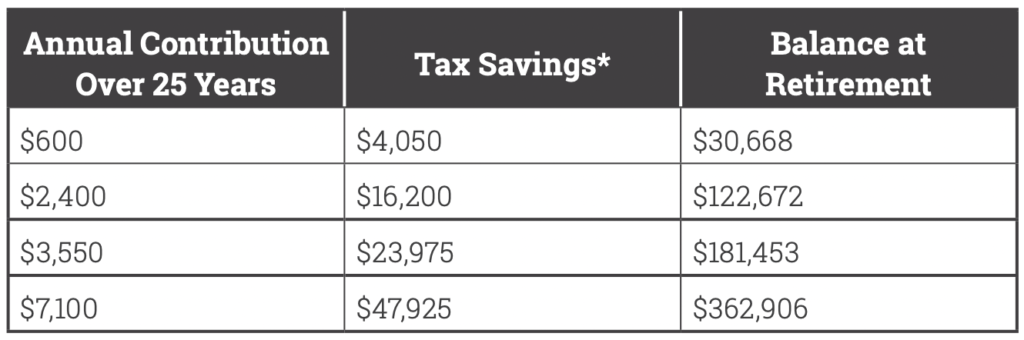
But an HSA is also a powerful investment vehicle and can be a smart addition to your retirement strategy. What makes an HSA such a great retirement investment tool? Simply put, money goes into an HSA tax-free, grows tax-free, and comes out tax free. That means you will never be taxed when you use HSA dollars for qualified medical expenses. No other investment account offers this benefit!

How much can you potentially save for retirement? See below!

flex facts hsa investment chart

Qualifying Expenses

The IRS determines what expenses are eligible under an HSA. Below are some examples of common eligible expenses:

– Copays, deductible payments, coinsurance

– Doctor office visits, exams, lab work, x-rays

– Hospital charges

– Prescription drugs y Dental exams, x-rays, fillings, crowns, orthodontia

– Vision exams, frames, contact lenses, contact lens solution, laser vision correction

– Physical therapy

– Chiropractic care

– Medical supplies and first aid kits

– Prescribed over-the-counter medications

– COBRA premiums

– And much more…

What doesn’t qualify?

Certain expenses are not eligible, for instance:

– Expenses incurred prior to opening your HSA

– Cosmetic procedures or surgery

– Dental products for general health

– Personal hygiene products

For a full list of eligible expenses, go to www.flexfacts.com.

Online & Mobile Access

Get instant access to your account with the Flex Facts Portal and the Flex Facts Mobile App.

– View your account balance and transaction history

– Submit and view claims

– Upload and store receipts

– Make contributions

– Invest HSA funds

– View important alerts and communications

– Sign up for direct deposit

– Sign up for text message alerts

Register for the Flex Facts Participant Portal at www.flexfacts.com. Download the Flex Facts Mobile App on the App Store or Google Play Store.

Helpful Hints

– You must have funds in your HSA before you can spend them.

– You can change your election amount at any time during the plan year.

– You own the HSA, which means the money in the account is yours to keep and stays with you, even if you change medical plans or leave your employer.

– Remember, withdrawals for qualified healthcare expenses are never taxable.

– Be a savvy HSA consumer and ask about the cost of procedures and provider visits to ensure you are getting the best care at the best price.

– Save your receipts because the IRS may audit your HSA transactions.

– Unused funds roll over year to year and once your account balance reaches $1,000 you have the option to invest your funds and accelerate your account savings.

– While your HSA funds are intended for healthcare expenses, once you reach 65 you have the option to use your account for any purpose, without penalty. You’ll just owe income taxes on withdrawals for non-qualified expenses.

– The easiest way to manage your account is online at www.flexfacts.com or through the Flexfacts Mobile App.

Gates County Schools Colonial Life / Health Advocate EAP + Work/Life Programs 2026-2027

Employee Assistance Program (EAP)

The Health Advocate Employee Assistance Program (EAP), available through your Colonial Life Group Term Life Insurance, offers confidential, short-term counseling from Licensed Professional Counselors for a full range of personal issues and achieving a healthy work/life balance across the life span. In a crisis, emergency help is available 24/7.

– Stress, anxiety, depression

– Relationship, family, parenting issues

– Substance Abuse

– Anger, grief, loss

– Life transitions

– Referrals for additional treatment, as needed

888-645-1772  |   ColonialLife.com/EAP

Work/Life Planning Services

The Health Advocate work/life services, available through your Colonial Life Group Term Life Insurance, offers financial and legal counseling services, as well as grief support and referral for up to 12 months after a claim.

877.240.6863   |   HealthAdvocate.com/members  (Organization Name: ColonialLife-LifePlanning)

Gates County Schools The FSA Store 2026-2027

Take control of your health and wellness with guaranteed FSA-eligible essentials. Pierce Group Benefits partners with the FSA Store to provide one convenient location for Flexible Spending Account holders to manage and use their FSA funds, and save on more than 4,000 health and wellness products using tax-free health money. Through our partnership, we’re also here to help answer the many questions that come along with having a Flexible Spending Account!

– The largest selection of guaranteed FSA-eligible products

– Phone and live chat support available 24 hours a day / 7 days a week

– Fast and free shipping on orders over $50

– Use your FSA card or any other major credit card for purchases

Other Great FSA Store Resources Available To You

Eligibility List: A comprehensive list of eligible products and services

FSA Calculator: Estimate how much you can save with an FSA

Learning Center: Easy tips and resources for living with an FSA

Savings Center: Where you can save even more on FSA-eligible essentials

FSAPerks: Take your health and funds further with the FSA Store rewards program


NEED HELP? WE’VE GOT YOU COVERED!

FSA Store Customer Service

FSA Store Frequently Asked Questions

Gates County Schools Ameriflex Important Flex Account Information 2026-2027

Online Account Instructions

How to Access Your Ameriflex Account:

Go to MyAmeriflex.com and click “Login” from the upper right hand corner. When prompted, select “Participant.”

How to Register Online For Your Ameriflex Spending Account:

Click the register button atop the right corner of the home screen.

  1. As the primary account holder, enter your personal information.
    – Choose a unique User ID and create a password (if you are told that your username is invalid or already taken, you must select another).
    – Enter your first and last name.
    – Enter your email address.
    – Enter your Employee ID, which in most cases, will be the account holder’s Social Security Number(no dashes or spaces needed).
  2. Check the box if you accept the terms of use.
  3. Click ‘register’. The process may take a few seconds. Do not click your browser’s back button or refresh the page.
  4. Last, you must complete your Secure Authentication setup. Implemented to protect your privacy and help us prevent fraudulent activity, setup is quick and easy. After the registration form is successfully completed, you will be prompted to complete the secure authentication setup process:
    Step 1: Select a Security Question option, and type in a corresponding answer.
    Step 2: Repeat for the following three Security Questions, then click next.
    Step 3: Verify your email address, and then click next.
    Step 4: Verify and submit setup information.
  5. The registration process is complete! Should you receive an information error message that does not easily guide you through the information correction process, please feel free to contact our dedicated Member Services Team at 888.868.FLEX (3539).

After registering, you can log into your account to:

– Check your balance

– Order replacement cards

– Submit claims for reimbursement

– Update your reimbursement method, and more…

Want to Manage Your Account on the go?

Download the MyAmeriflex mobile app, available through the App Store or Google Play. This is the quickest and easiest way to access your account on the go. The mobile app offers the same functionality as your online account.

Your credentials for the MyAmeriflex Portal and the MyAmeriflex Mobile App are the same; there is no need for separate login information!

Using Your Ameriflex Card

You’ll receive a Mastercard debit card linked to your Ameriflex account that can be used to pay for eligible expenses. If you have more than one account, such as a flexible spending account and dependent care account, your card is linked to both accounts and knows which funds to pull from when you make a purchase. If you lose your card, you can request a complimentary replacement by logging into your Ameriflex account or the Ameriflex mobile app.

Eligible Expenses

Before you make a purchase, it’s important to verify that the expense is eligible under the rules of your plan. Spending and saving accounts reimburse specific expenses unique to those accounts. Visit our Help Center for more information about eligible expenses.

Help Center and Support

Your satisfaction is our top priority, and our team of experts are ready to help whenever you need it. The Help Center is the best place to go for quick answers to your questions and more information about your account. You can access the Help Center at myameriflex.com/HelpCenter.

The Ameriflex Participant Services team is available Monday – Friday: 7:00 AM to 8:00 PM CST and Saturday: 9:00 AM to 1 :00 PM CST.

Call: 888.868.3539
Email: service@myameriflex.com
Live Chat: myameriflex.com

Gates County Schools Ameriflex DCA 2026-2027

Set aside tax-free money for daycare and dependent care services.

Use the below information to determine if a Dependent Care Account (DCA) is right for you and how to best take advantage of a DCA account.

How It Works

When you enroll in a Dependent Care Account (DCA) you get to experience tax savings on expenses like daycare, elderly care, summer day camp, preschool, and other services that allow you to work full time.

The Value & Perks

– Save On Eligible Expenses: You can use a DCA to pay for qualifying expenses such as daycare, summer day care, elder care, before and after school programs, and pre-school.

– Keep More Money: The funds are taken out of your paycheck “pre-tax” (meaning they are subtracted from your gross earnings before taxes) throughout the course of the year. Let’s say you earn $40,000 a year and contribute $1,500 to an DCA; so, only $38,500 of your income gets taxed. That means you are increasing your take-home pay simply by participating!

– Easy Spending and Account Management: You will receive an Ameriflex Debit Mastercard linked to their DCA. They can use their card for eligible purchases everywhere Mastercard is accepted. Account information can be securely accessed 24/7 online and through the mobile app.

Eligible DCA Expenses

The IRS determines what expenses are eligible under a DCA. Here are some examples of common eligible expenses:

– Daycare or elder care

– Before-school and after-school care

– Preschool and nursery school

– Private sitter

– Summer day camp

– Nanny service

For a full list of eligible expenses, go to myameriflex.com/eligibleexpenses.

Martinsville City Public Schools Important Information About Your Enrollment 2026-2027

IN-PERSON

During your annual enrollment period, a PGB Benefits Representative will be available by appointment to meet with you one-on-one to help you evaluate your benefits based on your individual and family needs, answer any questions you may have, and assist you in the enrollment process.

ANNUAL ENROLLMENT PERIOD: May 1, 2026 – May 15, 2026
ELIGIBILITY:

– Permanent employees regularly scheduled to work 37.5 hours or more per week are eligible for benefits.

IMPORTANT NOTICES:

When do my benefits start? The plan year for Colonial Life Insurance Products, The Local Choice Benefits (Anthem Health, Delta Dental of VA, and Anthem Blue View Vision), Flex Facts Health Savings Accounts, Delta Dental (Stand-Alone Policy), Aetna Vision (Stand-Alone Policy), and The Hartford Long-Term Disability runs from July 1, 2026, through June 30, 2027.

When do my deductions start? Deductions for Colonial Life Insurance Products, The Local Choice Benefits (Anthem Health, Delta Dental of VA, and Anthem Blue View Vision), Flex Facts Health Savings Accounts, Delta Dental (Stand-Alone Policy), Aetna Vision (Stand-Alone Policy), and The Hartford Long-Term Disability start July 2026 for enrolled employees.

Why have my Medical Bridge benefits not started yet? The Health Screening Rider on the Colonial Medical Bridge plan has a 30-day waiting period for new enrollees. Coverage, therefore, will not begin until July 31, 2026.

I want to sign my family up for benefits as well, what information will I need? If signing up for any coverage on your spouse and/or children, please have their dates of birth and social security numbers available when speaking with the Benefits Representative.

What is the difference between pre- and post-tax benefits? Pre-tax benefit contributions are taken from an employee’s paycheck before state and federal taxes are applied. Post-tax benefit contributions are paid after taxes are deducted. It’s important to note that some coverages may still be subject to taxes even if paid for through pre-tax deduction or employee contribution.

Can I change my benefit elections outside of the enrollment period? Elections made during this enrollment period CANNOT BE CHANGED AFTER THE ENROLLMENT PERIOD unless there is a family status change, otherwise known as a qualifying life event (QLE), as defined by the Internal Revenue Code. Examples of a QLE can be found here.

I have a pre-existing condition. Will I still be covered? Some policies may include a pre-existing condition clause. Please read your policy carefully for full details.


YOU CAN MAKE THE FOLLOWING BENEFIT ELECTIONS DURING THE ANNUAL ENROLLMENT PERIOD:

– Enroll in, change, or cancel The Local Choice benefits (Anthem Health, Delta Dental of VA, and Anthem Blue View Vision).
– Enroll in, change, or cancel Health Savings Accounts.
– Enroll in, change, or cancel Dental Insurance (Stand-Alone Policy).*
– Enroll in, change, or cancel Vision Insurance (Stand-Alone Policy).*
– Enroll in, change, or cancel Long-Term Disability Insurance.
– Enroll in, change, or cancel Colonial coverage.

*The Dental and Vision Stand-Alone Policies are for employees who have waived coverage under the Local Choice (Health, Dental and Vision) plan. Employees enrolled in The Local Choice plan may not enroll in the Dental or Vision Stand-Alone Policies.


IMPORTANT NOTE & DISCLAIMER

This is neither an insurance contract nor a Summary Plan Description and only the actual policy provisions will prevail. All information in your benefits guide including premiums quoted is subject to change. All policy descriptions are for information purposes only. Your actual policies may be different than those in the benefits guide.

Gates County Schools Ameriflex FSA 2026-2027

An account for setting aside tax-free money for healthcare expenses.

Use the below information to determine if a Flexible Spending Account (FSA) is right for you and how to best take advantage of an FSA account.

How It Works

When you enroll in a Flexible Spending Account (FSA) you get to experience tax savings on qualified expenses such as copays, deductibles, prescriptions, over-the-counter drugs and medications, and thousands of other everyday items.

Can I have an FSA and an HSA?

You can’t contribute to an FSA and HSA within the same plan year. However, you can contribute to an HSA and a limited purpose FSA, which only covers dental and vision expenses.

As per IRS Publication 969, an employee covered by an HDHP and a health FSA or an HRA that pays or reimburses qualified medical expenses generally can’t make contributions to an HSA. An employee is also not HSA-eligible during an FSA Grace Period. An employee enrolled in a Limited Purpose FSA is HSA-eligible.

As a married couple, one spouse cannot be enrolled in an FSA at the same time the other is contributing to an HSA. FSA coverage extends tax benefits to family members allowing the FSA holder to be reimbursed for medical expenses for themselves, their spouse, and their dependents.

The Value & Perks

– Election Accessibility: You will have access to your entire election on the first day of the plan year.

– Save On Eligible Expenses: You can save up to 40% on thousands of eligible everyday expenses such as prescriptions, doctor’s visits, dental services, glasses, over-the-counter medicines, and copays.

– Keep More Money: The funds are taken out of your paycheck “pre-tax” (meaning they are subtracted from your gross earnings before taxes) throughout the course of the year. Let’s say you earn $40,000 a year and contribute $1,500 to an FSA; so, only $38,500 of your income gets taxed. That means you are increasing your take-home pay simply by participating!

– Easy Spending and Account Management: Employees will receive an Ameriflex Debit Mastercard linked to their FSA. Employees can use their card for eligible purchases everywhere Mastercard is accepted. Account information can be securely accessed 24/7 online and through the mobile app.

Eligible FSA Expenses

The IRS determines what expenses are eligible under an FSA. Below are some examples of common eligible expenses:

– Deductibles

– Copays

– Prescriptions

– Teeth cleaning

– LASIK

– Glasses and contact lenses

– Band-aids

– Sunscreen

– Over-the-counter medicine (prescription required)

– Feminine menstrual care

For a full list of eligible expenses, go to myameriflex.com/eligibleexpenses.

The “Use-or-Lose” Rule

If you contribute dollars to a reimbursement account and do not use all the money you deposit, you will lose any remaining balance in the account at the end of the eligible claims period. This rule, established by the IRS as a component of tax-advantaged plans, is referred to as the “use-or-lose” rule.

To avoid losing any of the funds you contribute to your FSA, it’s important to plan ahead as much as possible to estimate what your expenditures will be in a given plan year.

Gates County Schools Enrollment Instructions – BenSelect 2026-2027

Below is a series of instructions outlining the online self-enrollment process. Please have the following information available before you begin:

– Username, pin, and enrollment website URL from Step 1 of this page

– Dates of birth and social security numbers of your spouse and any dependents you wish to enroll

– Beneficiary names and social security numbers

Helpful Tips:

– If you are a new employee, please refer here for more information or contact PGB’s Employee Services at 888-662-7500 between 8:30am and 5:00pm for assistance.

– If you are an existing employee and unable to log into the online system, please contact PGB’s Employee Services at 888-662-7500, or speak with the Benefits Representative assigned to your location.

How To Enroll:

1. Logging In 

Enter your User Name: Social Security Number with or without dashes (ex. 123-45-6789 or 123456789)

Enter your Pin: Last 4 numbers of your Social Security Number followed by last 2 numbers of your Date of Birth year (ex. 678970)

To login, visit: harmony.benselect.com/gates

2. New PIN

The screen prompts you to create a NEW PIN [__________].

3. Security Questions

Choose a security question and enter answer [__________].

4. Confirm

Confirm (or enter) an email address.

5. Save New PIN

Click on ‘Save New PIN’ to continue to the enrollment welcome screen.

6. Click Next

From the welcome screen click “Next”.

7. Personal Information

The screen shows ‘Personal Information’. Verify that the information is correct and enter the additional required information (marital status, work phone, e-mail address). Click ‘Next’.

8. Adding Family Members

The screen allows you to add family members. It is only necessary to enter family member information if adding or including family members in your coverage. Click ‘Next’.

9. Benefit Summary

The screen shows ‘Benefit Summary’. Review your current benefits and make changes/selections for the upcoming plan year.

10. Sign & Submit

Click ‘Sign & Submit’ once you have decided which benefits to enroll in.

11. Review

Review your coverage. If any items are ‘Pending’, you will need to decide whether to enroll or decline this benefit.

12. Next

Click ‘Next’ to review and electronically sign the authorization for your benefit elections.

13. Sign Form

Review the confirmation, then if you are satisfied with your elections, enter your PIN and click ‘Sign Form’.

14. Download & Print

Click ‘Download & Print’ to print a copy of your elections, or download and save the document. Please do not forget this important step! Click ‘Log Out’.